If you have ever needed to make a quick edit to a PDF — fix a typo, add your signature, highlight something, or add a watermark — you know how frustrating most free PDF editors are. They have daily limits. They watermark your document. They upload your files to their servers. Some charge you just to download.
We built CursorEdit to solve exactly these problems.
What is CursorEdit?
CursorEdit is a free online PDF editor built by Cookies & Cursor Technologies. It runs entirely in your browser — your PDF never leaves your device. Nothing is uploaded to our servers. Everything happens locally, which means your documents stay private.
You can access it here: cookiescursor.com/tools/cursoredit/
What Can You Do With CursorEdit?
Edit Existing Text
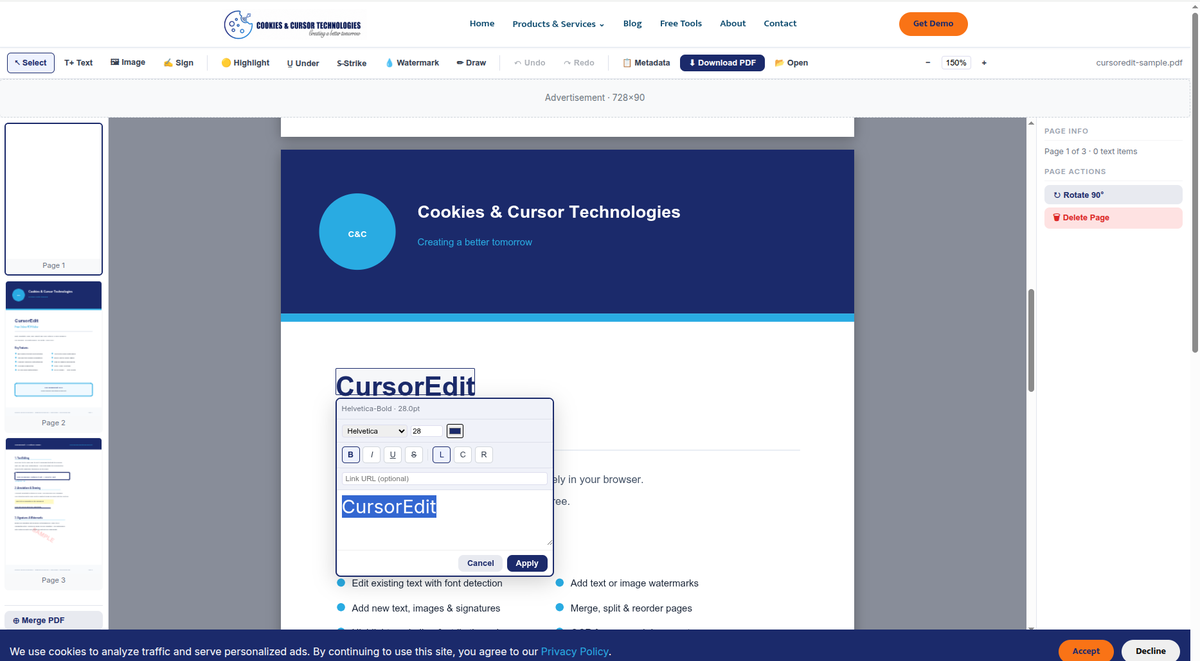
Click on any text in your PDF and edit it directly. CursorEdit automatically detects the font name, size, and color of the original text so your edits blend in naturally. This is something most free PDF editors do not attempt — they only let you add new text on top.
Add New Text, Images and Signatures
Need to add information that is not already in the document? Switch to Text mode, click anywhere on the page, and type. You can also insert images and add signatures — draw your signature with your mouse, type it in a handwriting style, or upload an image of your signature.
Annotate Your Documents
Highlight important sections, add underlines, strikethroughs, or draw freehand on the page. All annotations are baked into the exported PDF — no separate annotation layer that breaks in other viewers.
Add a Watermark
Add a text or image watermark to all pages or just the current page. Control the opacity, rotation, and position. Useful for marking documents as CONFIDENTIAL, DRAFT, or adding your company logo.
Fill PDF Forms
CursorEdit automatically detects form fields in your PDF and lets you fill them directly. No need to print, fill by hand, and scan back.
Manage Pages
Merge multiple PDFs together, reorder pages by dragging, rotate individual pages, or delete pages you do not need. All page management happens before you export — you see exactly what the final PDF will look like.
Handle Scanned Documents
If you upload a scanned PDF with no real text layer, CursorEdit detects this automatically and offers two options: run OCR (optical character recognition) using Tesseract directly in your browser to extract the text, or choose a clean template and recreate the page with the extracted content.
Undo and Redo
Every action is undoable. Made a mistake? Press Ctrl+Z. Changed your mind? Ctrl+Shift+Z brings it back. The undo stack keeps your last 50 actions.
No Limits, No Watermark
CursorEdit does not add a watermark to your exported PDF. There are no daily task limits. No page limits. No file size restrictions beyond what your browser can handle. The downloaded PDF is clean and ready to use.
Is It Safe to Use?
Yes. CursorEdit processes everything client-side in your browser. Your PDF is never sent to any server. We cannot see the contents of your documents. This makes it safe to use even for sensitive documents like contracts, invoices, and official forms.
However, please note: you are responsible for ensuring you have the legal right to edit any document you upload. Do not use CursorEdit to alter official government documents, legal records, or any document where modification would be unlawful.
How to Get Started
- Go to cookiescursor.com/tools/cursoredit/
- Drag and drop your PDF onto the upload area, or click to choose a file
- Use the toolbar to select the tool you need
- Click Download PDF when you are done
That is it. No account required, no signup, no payment.
Built for Everyone
CursorEdit is part of our growing library of 100+ free online tools at cookiescursor.com/tools/. Like all our tools, it is designed to work simply and quickly without getting in your way.
If you have feedback or find a bug, reach out to us at [email protected]